How to fix the shifting face problem in AI video
Field notes from building a recurring AI character: why faces drift between scenes, what actually anchors identity, and the voice cloning lessons that cost us real render credits.
Brayden6 min read
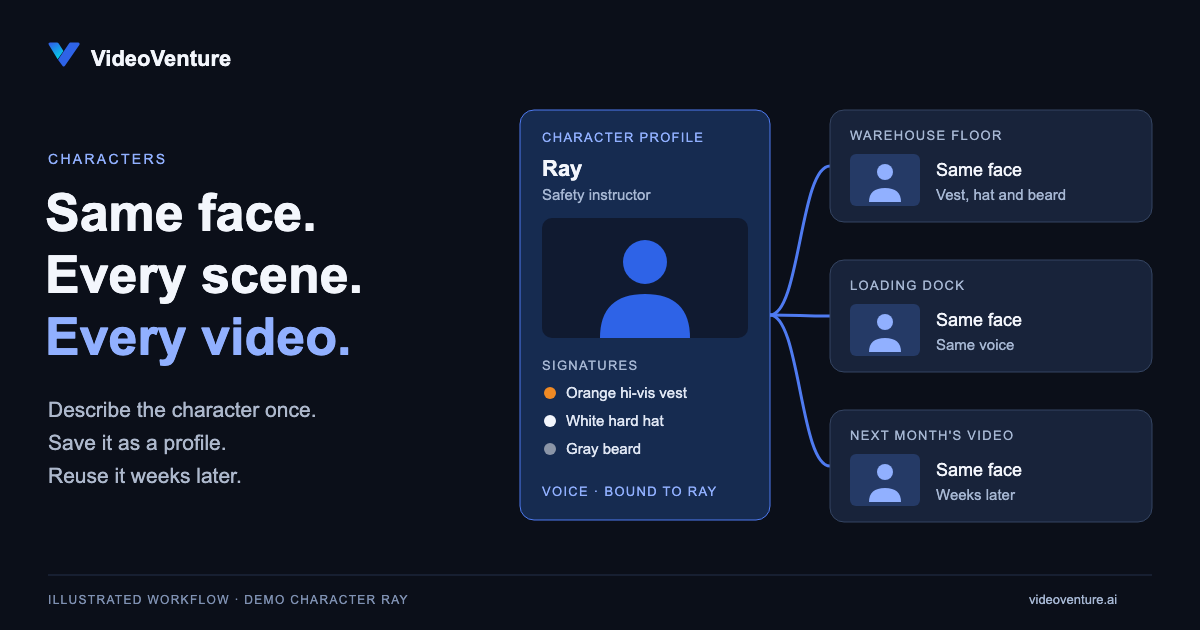
If you have ever tried to create an AI video with a recurring character, you know the exact moment the illusion breaks. Shot one shows a person in a navy jacket explaining a product. Shot two shows a completely different person in a leather jacket with a slightly different jawline and hair color.
When every single scene prompt generates a fresh face and new wardrobe, your video stops looking like a professional marketing campaign and starts looking like a random collage.
Recently, a client reached out to us after getting deeply frustrated with other AI video tools on the market. They needed to produce a series of safety demonstration videos featuring a single, recognizable instructor. They came into VideoVenture, created their character profile, saved it, and put that character directly into their safety scenes.
It came out perfect on the first try.
When every scene prompt generates a fresh face, your video stops looking like a campaign and starts looking like a random collage.
This post is half explanation and half field notes. To write it, we built a demo character from scratch, an instructor named Ray, and produced the finished spot you'll see below with the exact workflow described here. Some of it worked on the first try. Some of it cost us a pile of render credits to get right, and those parts are the most useful things in this post.
Why faces drift, and how a saved profile stops it
Character drift is not bad luck. It happens because every new prompt re-describes your character from scratch, and every re-description is a fresh chance for the model to reinterpret a jawline, a hair color, or a jacket.
A saved character profile removes that chance entirely. When you create a character in VideoVenture, the studio locks in their reference images and an exact description of their features and wardrobe. Every shot that character appears in gets the same references and the same description, word for word. Nothing gets re-described, so nothing drifts.
That profile lives in your workspace, not inside any one video. The safety instructor you create today shows up identical in the video you build next month, and the one after that.
Give your character three signatures
Here's a detail that took us a while to appreciate: identity survives best in close and mid shots. In a wide shot, the face is a dozen pixels, and no reference image can save it. What carries a wide shot is silhouette and wardrobe.
So when we designed Ray, we gave him three high-contrast, nameable anchors: an orange hi-vis vest, a white hard hat, and a gray beard. Any one of them reads at any distance. When the video cuts from a warehouse floor to a loading dock, the viewer's eye checks those three signatures and confirms "same guy" without knowing it did any work.
If your character's outfit is "a dark shirt," you have no anchors. Pick things you could describe over the phone.
Your characters can speak now
We are excited to take this even further with our newest feature drop. You can now give your saved character a distinct voice.
The voice is bound to the character, not to a video. That means you can place your consistent character into any scene, animate them with natural chat instructions, and give them a script to speak on camera. More importantly, you can repeat that exact character and voice combination across dozens of separate videos over weeks or months.
Plenty of point solutions can generate a single talking head clip. But what makes VideoVenture different is having this capability integrated directly into a fully agentic studio. You do not have to export files between five separate web tools or subscription plans. You talk to the agent, place your character, adjust scene timing, lay music under the dialogue, and export a finished spot.
Field notes: what cloning Ray's voice actually took
This is the part nobody writes about, so here is exactly what happened to us this week.
We gave Ray a deep, gravelly voice, the kind thirty years of job sites earns you. The seed sample sounded great. Then his first speaking clip came back sounding like a navigation system. Robotic, flat, wrong.
The seed was the problem, but not in the way you'd guess. It was a punchy 9-second briefing line, all short sentences and pauses. Voice cloning models don't learn character from punch. They learn timbre from flow. We re-seeded the same voice from about 20 seconds of smooth, continuous speech and the difference was night and day.
There's real math behind why, and it also explains why deep voices have it hardest:
Try it: what the cloner actually sees
The whole strip is one 25 ms analysis frame. A deep voice barely finishes two cycles in it; a higher voice hands the model twice the evidence per frame.
In simplified terms: speech models analyze audio in tiny frames, roughly 25 milliseconds each. A deep voice near 100 Hz completes barely two wave cycles inside one frame, while a higher voice hands the model twice the evidence in the same window. And every pause in your seed is a frame with no voice in it at all. Deep voice plus short choppy seed is the worst possible combination, which is precisely what we started with.
One more directing rule we hold to: a video gets one voice of authority. Either your character speaks on camera or a narrator carries the story, never both. Two voices compete for the viewer's trust, and both lose. Let music fill the space instead.
Instant brand kits: Minutes instead of hours
Character consistency is only half the battle. The other half is keeping your company brand identity intact.
If you hired a human designer to audit your brand, they would spend hours digging through your website, grabbing hex codes, downloading logo files, and documenting your tone of voice. Even if they were fast, it would take at least a few hours to pull that style guide together.
VideoVenture does that entire process in minutes.
You point the studio at your website URL once. It pulls your primary colors, logos, and tone of voice, then saves those preferences for every video you build down the road. They go into each scene as exact values, never adjectives, for the reason I explain in why pure AI video feels wrong. If your brand updates its look next quarter, you can change your kit at any time with a simple chat instruction.
Building marketing videos that actually belong to your brand
If you are tired of juggling separate tools for voice generation, character creation, stock footage, and timeline editing, it is time for a workflow that keeps everything under one roof.
See why creators and businesses are switching over to create on-brand, character-consistent videos in minutes.