Building a text-to-video AI platform is one thing. Proving it actually creates videos people want to watch is another.
When I launched VideoVenture, my pitch was simple: Stop editing. Start directing. You type a single text prompt, and the AI generates the media, paces it, scores it, and formats it. No timeline required.
But I wanted to know if this AI shorts generator could handle the most ruthless, fast-paced environment on the internet: the YouTube Shorts algorithm.
So, I started a faceless YouTube channel from absolute zero. I made a strict rule for this YouTube automation experiment: Zero manual timeline editing allowed, and absolutely zero external footage. Every single Short had to be generated entirely from scratch by VideoVenture.
Today marks exactly Day 15 of the channel. Here is what happened.
Why most Faceless YouTube Automation fails
If you search for "faceless youtube channel AI," you'll see hundreds of tutorials telling people to use ChatGPT to write a script, generate a robotic voiceover, and slap generic, unrelated stock footage over it.
The algorithm (and viewers) have gotten smart. They hate that stuff. It feels cheap, lifeless, and disconnected.
To win on Shorts, you need the video to feel like it has a soul. You need a hook that survives the first 3 seconds. You need fast cuts that hit on the beat. You need the B-roll to actually match what the narrator is saying. You need sound design.
I wanted to see if VideoVenture could replicate that human "feel" using just a text prompt.
The goal wasn't to spam the platform with generic AI content. The goal was to see if VideoVenture could generate a genuinely engaging viral Short faster than a human could edit one.
The "Magical Moments": Why this AI Shorts Generator is different
Most AI video tools just slap a random lo-fi beat under your video, add some captions, and call it a day. But to get 30,000 views, the generation has to be smarter than that.
For this channel, I relied heavily on three unique VideoVenture features that separate it from standard text-to-video tools:
- Voice-to-Scene Matching: The AI actually builds the B-roll and scenes custom to the generated voiceover. This creates these "magical moments" where a visual cue on screen lines up perfectly with a word the narrator says—exactly like a human editor would do it.
- Dynamic AI Scoring: The music isn't just a random stock track. It is generated and paced based on the scene plan and the emotional content of the video.
- Automated Sound Design: I toggled the setting to let the AI automatically create and place sound effects (whooshes, risers, impacts) at key visual moments to enhance viewer retention.
The Workflow & The Exact Prompt
Because the AI was doing all the heavy lifting, my actual workflow was almost nonexistent. Each video took me less than 30 seconds to configure, and a few minutes for the AI to render.
Here is the exact master prompt I used to generate the Shorts:
"Create a cinematic video about [TOPIC] —[one sentence that captures the most dramatic hook of the story]. Make it dramatic, fast-paced, and visually stunning — open with a hook that stops the scroll, pack in surprising facts, and end with a closer that lingers."
That's it. I just swapped out the [TOPIC] and the hook for each video, selected the 9:16 (Vertical) option, and let the AI cook.
The Results: The algorithm doesn't care how you edit
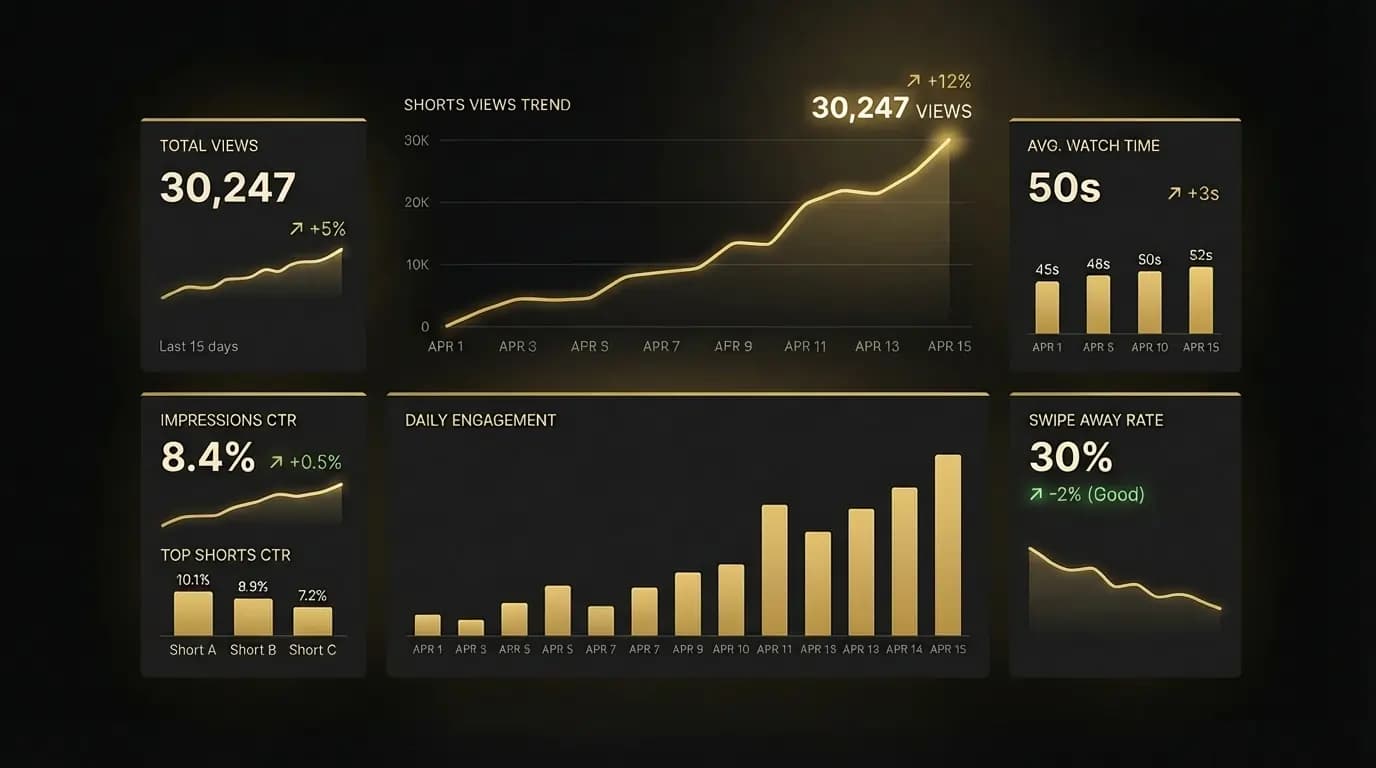
Getting over 30,000 views and 50 subscribers in the first 15 days of a fresh channel proved my biggest theory: The YouTube algorithm doesn't care if you spent 6 hours manually dragging clips on a timeline, or 30 seconds prompting an AI.
It only cares about retention. It cares if the pacing is good enough to stop the scroll.
Because VideoVenture actually understands scene planning, voiceover sync, and sound design, the videos it generated had the exact rhythmic pacing that Shorts require.
You don't need to be a professional video editor to grow a channel anymore. You just need a great hook and a clear vision. The AI handles the mechanics of the timeline, the B-roll, the music, and the sound effects.
The Day 90 Reveal
Right now, I am keeping the channel completely anonymous. I want to see how far the YouTube algorithm will push these AI-generated videos entirely on organic merit, without any external traffic from this blog or my Twitter.
Will I ever reveal the channel? I'm planning to do a full breakdown and link the channel on Day 90 of this experiment.
But the first 15 days are officially a success. It proved that VideoVenture isn't just a toy—it's a viable, high-retention AI Shorts generator for creators.
If you've been wanting to start a YouTube channel, a TikTok, or an Instagram theme page, your excuse is officially gone.
Open the Studio, type your topic into the prompt box, and let the AI generate your first Short.