It's been about a month since OpenAI officially discontinued Sora.
Despite being hailed as a technological miracle, it turns out that generating hyper-realistic video from a single text prompt isn't actually a product. As the dust settles, the consensus from creators is clear: users “struggled to find consistent, practical uses for the technology.”
I wasn't surprised. When I first built VideoVenture, the goal was to kill the video editing timeline. I wanted to replace hours of dragging clips with a simple text box. But as I watched users interact with pure prompt-to-video AI, I realized it has a fundamental flaw: The Slot Machine Effect.
The Black Box Problem (And why Sora really failed)
Let's be clear: Sora faced massive hurdles. The server compute costs were astronomical, the render times were painfully slow, and the copyright issues were a legal nightmare.
But even if OpenAI managed to make generation instant and completely free, the core product UX was still fundamentally flawed.
Here is what happens when you use almost any text-to-video AI tool on the market today:
- You type a prompt.
- You wait anywhere from 3 to 15 minutes for it to render.
- The AI spits out a video.
Let's say the video is 80% perfect. The pacing is awesome, but it picked the wrong B-roll clip for the ending.
In a pure text-prompt system, you have to type: "Change the last clip to the drone shot," and wait another 10 minutes for a new render. But because AI is a black box, regenerating the video often changes the other 80% that you actually liked.
You end up pulling the slot machine lever over and over. When renders are slow and compute is expensive, creators cannot afford to play the slot machine.
Creators want the speed of AI automation, but they absolutely refuse to surrender creative control. A black box text-to-video generator isn't a tool; it's a toy.
Forcing users back into a messy Premiere Pro timeline isn't the answer either. We needed a way to let creators see the plan before wasting time and compute power on rendering.
So over the last few weeks, I’ve been quietly completely rebuilding how VideoVenture processes your ideas to fix the exact problem Sora couldn't.
Welcome to the Storyboard Layer.
The Secret Sauce: Voiceover First
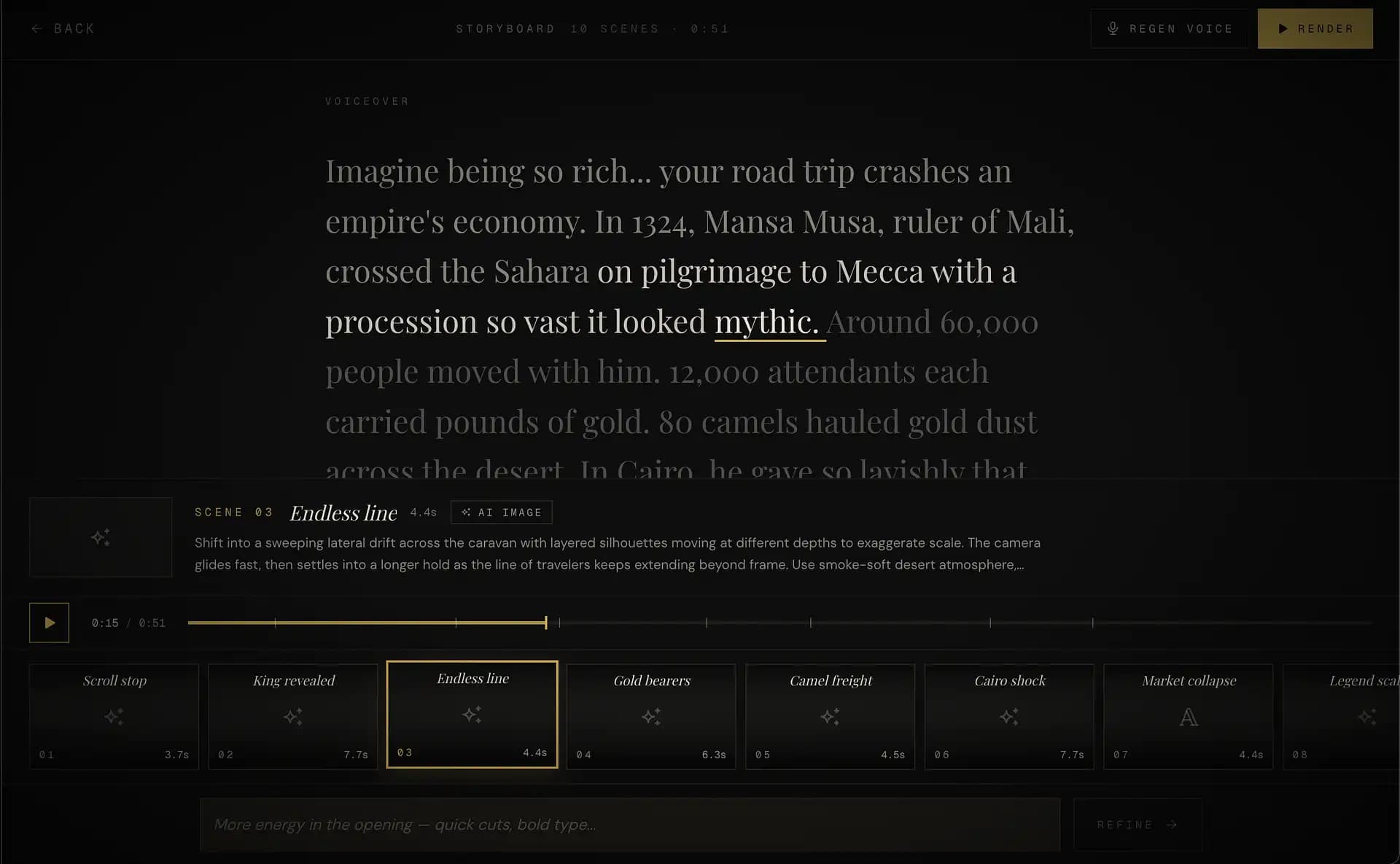
If you look at the screenshot above, you'll notice the script is front and center. That is by design.
Most AI video generators mash clips together and slap a random song underneath. The new VideoVenture engine generates the Voiceover First. The entire video storyboard is then intelligently built around that voice.
This architectural shift allows us to do something incredible: Magical Moments.
Because the AI knows exactly what the narrator is saying and when they are saying it, it builds the visuals to match.
- Text animations snap onto the screen exactly on the syllables they emphasize.
- The AI dynamically scores the background music, shifting the tone of the track perfectly in sync with the emotional beats of the script.
- Sound effects are perfectly timed to visual transitions.
By anchoring everything to the voiceover, we create videos where it is incredibly hard to tell that an AI edited the entire thing.
Talk to your storyboard
We added this depth, but we stayed true to the VideoVenture mantra: Absolute control through natural language.
In the new UI, as you read through your script, you can see exactly which scene is happening at any given word (notice how "mythic" highlights when Scene 03 is selected). This is especially powerful for perfecting the first 3 seconds of a video — the part that decides whether anyone watches the rest.
If you see a scene plan you don't like, you don't open a timeline and start manually syncing frames. You just talk to your storyboard.
At the bottom of the screen, you just type: "More energy in the opening — quick cuts, bold type..." The AI instantly refines the scene blocks to match your vision. You collaborate with the machine before you ever spend time rendering.
Complexity is completely "Opt-In"
I know there are users who loved the original, pure "magic" of VideoVenture. They don't want to review a script. They don't want to tweak scene pacing. They just want to type a prompt, get a coffee, and come back to a finished video.
That workflow isn't going anywhere.
The AI storyboard generator is completely opt-in. If you don't want the flexibility, you can just ignore the interface entirely and hit the big gold "RENDER" button in the top right the second your prompt is processed.
Pure text-to-video is dead. Natural language control is the future.
The Storyboard update is rolling out over the next few days. I cannot wait to see what you direct with it.