
You take a trip. You shoot hundreds of photos and clips. You come home fired up to make something cool with them.
Two weeks later, those files are still sitting on your camera roll, untouched.
I've done this more times than I want to admit. The gap between "I want to make a vacation video from these photos" and "I actually made a video" is huge, and it's not because the memories aren't worth it. It's because traditional video editing is a rabbit hole most people don't want to fall into.
We've all sat through boring, cross-fade photo slideshows. That's not what this is. This post is about the new way to make dynamic travel recap videos: describe the video you want and let AI build it for you. No timeline, no tutorials, no six-hour Saturdays.
Why making travel recap videos is so hard
If you've opened iMovie, CapCut, or Premiere with a vacation folder and closed it in frustration, you're not alone. Here's what usually goes wrong:
- The timeline is overwhelming. Layers, keyframes, transitions, audio tracks. You spend more time learning the interface than actually editing.
- Music rights are a minefield. Every song you'd actually want to use gets your video flagged or muted on YouTube and Instagram.
- You don't know what "good pacing" is. You cut a clip too long or too short and it feels off, but you can't articulate why.
- Exporting is its own boss fight. Wrong codec, wrong aspect ratio, wrong resolution, watermarks you didn't know were coming.
By the time you've fought through all of that, the excitement of wanting to share the trip is gone. The footage goes back in the drawer.
The bottleneck isn't creative vision. It's the tool. Most people have great raw material and a clear idea of what they want. They just don't want to become a video editor to make it.
The Alternative: An AI video maker that edits for you
Here's the workflow I use now, and the exact reason I built VideoVenture.
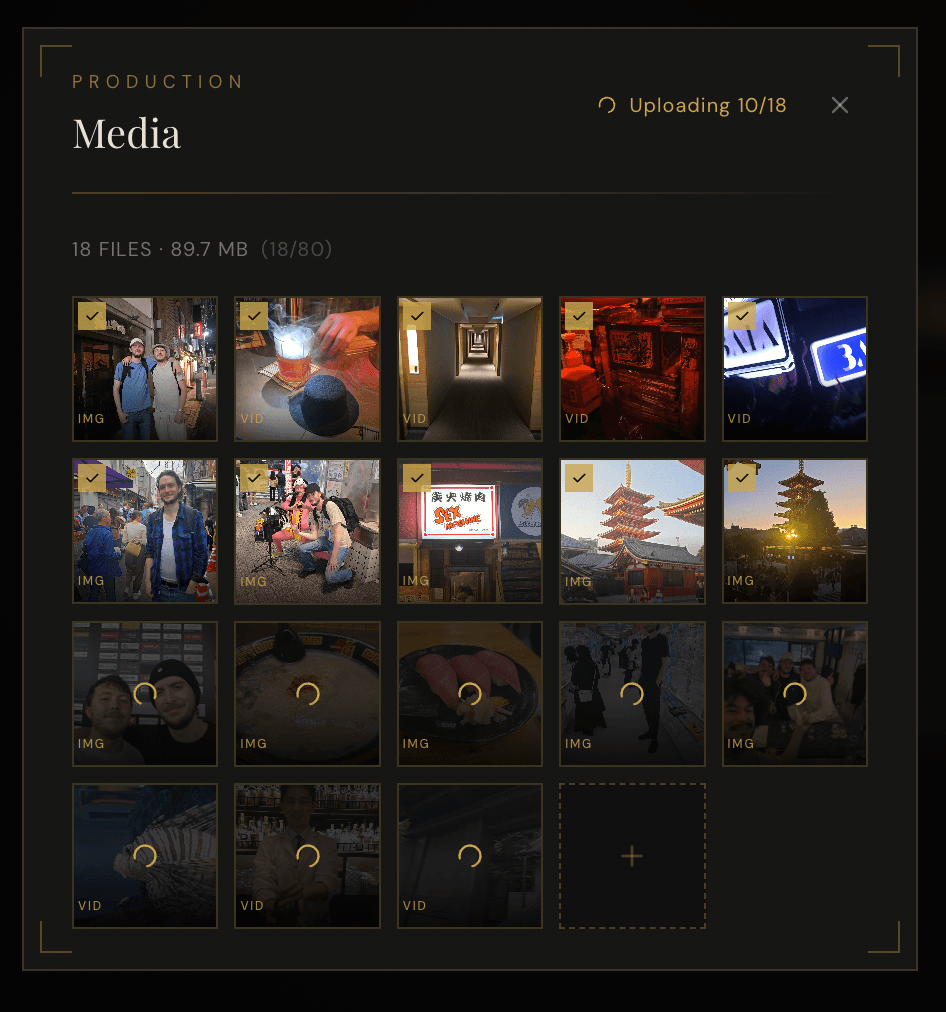
Step 1: Upload your raw vacation photos and clips
Dump everything in—photos, clips, voice memos, whatever you shot. Don't curate yet. Paid tiers let you upload up to 160 files per project, so you can upload a whole trip's worth of footage in one go. The AI is going to pick the best moments so you don't need to pre-edit.
Step 2: Describe the vibe
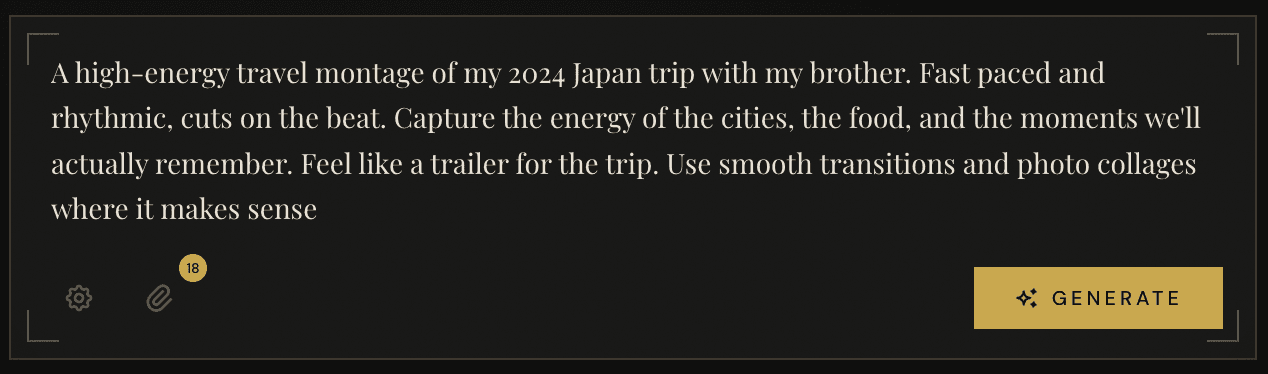
This is the part people get stuck on, so let me be specific. Don't write a shot list. Write a feeling.
Bad prompt: "Make a video of my trip."
Good prompt: "A peaceful travel video of my two weeks in Japan. Calm and reflective. Start with quiet morning shots at the shrines, build up with the food and city clips, end with a slow sunset. Feels like a memory you're looking back on."
The more you describe the mood instead of the shots, the better the AI can pick clips, pace them, and generate royalty-free music that matches perfectly.
Step 3: Let the AI cook
VideoVenture handles the parts you don't want to touch. Scene planning so the pacing actually makes sense. AI music scored to match the mood. Cuts that land on the beat. Aspect ratio cropping, whether you are posting to Instagram Reels, TikTok, or YouTube.
It takes a few minutes, not a few hours.
Step 4: Iterate without a timeline
This is the part most AI tools get wrong. You almost never love the first version. You should be able to tell it what to change in plain English and try again without starting over.
"Make the first section longer." "Use more of the food clips." "The music is too upbeat, make it calmer." That kind of thing.
I spent six hours on a traditional editor and got 30 seconds of "fine". The AI version took four minutes and I actually wanted to share it.
A real example: My AI-generated Japan trip
I wrote about this in my first post.
The prompt I used to turn my photos into a video was something like: "A travel montage of my trip to Japan with my brother. Energetic but reflective. Mix the food, the street life, and the quiet moments. Feel like a memory."
That's it. No timeline work, no music licensing, no export wizardry.
Tips for making the best AI travel videos
After making dozens of these, here's what actually matters for the algorithm:
- Upload variety. Wide shots, close-ups, people, landscapes, food, motion. The AI can't make a great video out of 50 photos of the exact same building.
- Be specific about mood. "Peaceful", "chaotic", "nostalgic", "fun". These words do more work than you'd expect.
- Don't accept the first version. The iteration is where the magic happens. Tell it what's off and try again.
- Pick your platform upfront. A video cut for a TikTok or Instagram Reel (9:16) feels entirely different than one cut for YouTube (16:9). Tell the AI which one you want.
- Include voiceover sparingly. A well-placed narration line adds a lot, but don't narrate the whole thing. Let the visuals and music carry it.
Save your prompt. Once you find a phrasing that produces the vibe you want, reuse it across trips. You'll build your own personal style over time.
Turn your photos into a video today
If you have a camera roll full of trip footage that never became anything, this is exactly what I built VideoVenture for.
There's a free tier with 100 credits a month, which is enough to make a full video with music and voiceover. No credit card, no trial period, no watermark nonsense. Just upload your stuff, describe what you want, and see what comes back.
Start for free and turn those vacation photos into something you actually want to share.
The trip was the hard part. Making the video shouldn't be.